Bing Webmaster Tools: the data your Search Console does not have
Also known as: BWT, Bing WMT, Bing webmaster tools
Do not underestimate Bing
Bing holds roughly 6 to 8 percent market share in Germany, which is why most people overlook the Webmaster Tools from Microsoft. Yet they hand you your link profile including anchor texts, free of charge. The part that matters for GEO: Bing shows who cites you in Copilot and for which question.
Inside Rankmio that data goes straight to work — in the visibility index, the citation tracker and the backlink hub. A small search engine, then, with genuinely interesting data. 😉
Bing Webmaster Tools (BWT) is Microsoft's free official tool for site owners — the Bing equivalent of Google Search Console. It provides data on search queries from Bing, indexing status, crawl statistics from Bingbot, backlink reports and, since February 2026, the AI Performance Report with Copilot citations. Microsoft was thus the first search platform with data of its own on AI citations; Google followed on 31 August 2026 with a performance report for generative AI features that reports impressions and pages for AI Overviews and AI Mode. Access is via bing.com/webmasters, with login through a Microsoft, Google or Facebook account. The property is verified by meta tag, XML file or CNAME DNS record.
The most important BWT reports
- Search performance — clicks, impressions, CTR and position per search query and URL — the equivalent of the GSC performance report, but for Bing.
- Sites — indexing status and crawl errors.
- SEO reports — technical site checks with a list of issues (missing meta data, thin content, slow loading times).
- Backlink report — completely free, based on Bing's own index and independent of Ahrefs/DFS/SE Ranking.
- URL submission API plus IndexNow integration for immediate re-crawling.
- AI Performance (since 02/2026) — Copilot citations with grounding queries, intents and topics.
What Bing Webmaster Tools show and the Search Console does not
The two tools are not alternatives, they are two separate bodies of data: each shows its own index. Bing holds six to eight percent market share in Germany, so the click figures stay small. The reason for Bing Webmaster Tools is therefore not the traffic, it is what Google does not hand out at all.
- The link profile as a complete export. Bing gives you three separate files: referring domains, referring pages and anchor texts, each with the number of links. Googles link report shows a selection and cannot be downloaded in that breakdown. For a second opinion on your own link profile, Bing is the only free source with an index of its own behind it.
- Copilot citations together with the question behind them. Both providers now deliver data on generative AI, but at a different depth. Google rolled out its performance report for generative AI features worldwide on 31 August 2026; it covers AI Overviews and AI Mode and shows impressions and the pages that appear in those features. Bing takes another route with the AI Performance Report and also names which addresses are cited in Copilot and in Bing answers, and which queries, intents and topics go with them. Rankmio reads both, the Bing report under /geo/bing-ai and the Google report under /geo/gsc-ai.
- Control over the crawler. In Bing Webmaster Tools you decide at which times of day Bingbot may fetch your site. Google removed that setting in January 2024.
- Technical checks on the individual page. The SEO reports in Bing look at titles, descriptions, headings and load behaviour and name the addresses affected. The Search Console has no such report.
The other way round, the Search Console stays ahead on four counts, and that belongs to the truth: it reaches back sixteen months, shows Core Web Vitals from real user data, checks rich results and covers Discover. Bing has none of that. Bing Webmaster Tools are the second opinion, not the second stage.
Which CSV exports actually deliver something
Rankmio reads seven reports from Bing Webmaster Tools. It recognises the type from the header row, so you do not have to pick anything, and several files can go up in one go. These are the seven, with what each is good for:
- Referring Domains with the columns Domain and Backlinks Count — which domains link to you and how often. The basis for cross-checking the figures of other providers.
- Referring Pages — the same question one level down, so which individual pages link to you.
- Referring Anchors with Anchor and Backlinks Count — the words people link to you with. This report exposes an unnatural link profile fastest, because bought links carry the same anchor text conspicuously often.
- Search Performance, Overview with Date, Clicks, Impressions, Avg. CTR and optionally Avg. Position — the daily series. It fills the history when the nightly fetch has gaps.
- Top Queries with Query, Clicks, Impressions, CTR and Avg. Position — the strongest search queries on Bing. They overlap with Google less than you would expect, and that is exactly where their value lies.
- Top Pages with URL or Page and the same metrics — which pages carry your Bing traffic.
- AI Performance in two versions: the overview with Date, Citations and Cited Pages, and the detail version Cited Queries with URL, Query, Citations, Intent and Topic. Upload both: the overview gives you the history, the detail version tells you which page was cited for which question.
An export pays off above all where the interface gives nothing. That applies to the link data, because the nightly fetch does run but comes back empty: Bings GetLinkCounts hands out no lists for these properties. And it applies to the AI Performance Report, for which Microsoft has published no interface so far. Search performance, by contrast, Rankmio fetches itself; there the export is the supplement and not the source.
How to upload the files into Rankmio
The route is always the same: you download the file at Bing and upload it into Rankmio. The prerequisite is that a verified Bing site is assigned to the project, which you do once in the project management.
- The link data belong in the backlink hub. The upload field sits there next to the Bing snapshot and takes referring domains, referring pages and anchor texts.
- Search performance belongs in the Bing area of the project under /bing-search. The URL coverage and the IndexNow submissions live there too.
- The two AI reports belong under /geo/bing-ai/upload. If Rankmio does not recognise the format, the message names the two accepted header rows plus the header row that was in your file, so you can see at once whether you grabbed the wrong report.
- Assigning the Bing site and the nightly sync live in the project management, and you can trigger the sync by hand there as well.
German header rows and umlauts are no obstacle, the import normalises them. Every upload creates a new snapshot and does not overwrite the previous one, so you can add files safely and compare later.
What Rankmio does with the BWT data
The connection runs through an API key or through the Microsoft account, after which each project is matched to its verified Bing site. What comes out of it has two sources — the API, and the CSV export for everything Microsoft offers no API for.
- Search data through the API — search queries, pages and the daily series of clicks, impressions and position, fetched nightly. Bing supplies the search queries weekly rather than daily.
- Backlinks effectively only via CSV — the API call runs nightly but comes back empty: Bing's
GetLinkCountshas never returned any lists for these properties. Usable figures come from the CSV export in Webmaster Tools alone. - Technical state — crawl and index statistics from Bingbot, the status of submitted sitemaps and the remaining submission quota.
- CSV import for seven report types — referring domains, referring pages, anchor texts, search performance overview, search queries, pages, and the AI Performance Report. Rankmio identifies the type from the column headers, and several files can be uploaded in one go.
- URL coverage — the Bing index status for every address from the latest sitemap crawl, described under Bing URL Coverage.
- Submission via IndexNow — individually or in bulk, straight from the coverage table.
The data leaves Rankmio through the project export, which carries search performance, coverage, IndexNow submissions, backlinks and AI citations as its own block. There is no separate CSV download for Bing data, and it would be the wrong way round anyway: you download the file from Bing and upload it into Rankmio.
Where the Bing data surfaces inside Rankmio
Nothing is collected for its own sake. Every figure has a place where it takes effect.
- Traffic pillar of the visibility index — Bing clicks and impressions from the last 30 days are added to the Google Search Console figures. With no Bing site linked, only Google counts.
- SERP pillar of the visibility index — the Bing search queries produce a visibility share of their own. It is added rather than netted against Google: someone searching on Bing is not the same person searching on Google. Bing stays out of the exhaustion figure, because the export only delivers the strongest queries.
- Citation pillar, citation tracker and dashboard — the Copilot citations from the AI Performance Report. They also serve as a source for the questions Rankmio uses to probe AI visibility further.
- Sitemap area — crawl and index statistics from Bingbot alongside Rankmio's own crawl results.
- Backlink hub — the most recent Bing snapshot, provided it was imported by CSV.
- Project export — search performance, coverage, IndexNow submissions, backlinks and AI citations as a block of their own in CSV, JSON and through the API.
API access and automation
The classic Bing Webmaster API covers search performance, sitemaps, crawl statistics and URL submission. It is less popular than the GSC API, because the smaller traffic delta rarely justifies the integration effort. As of July 2026 the AI Performance Report is not accessible via API — only through the CSV export in the UI. Rankmio has therefore built a CSV import that parses both variants of the BWT AI report (Overview and Cited Queries) tolerantly — including German headers and umlaut normalisation.
Example from practice
Example: An SME blog from Frankfurt sees 4,200 monthly clicks from Google in GSC and ignores Bing for a long time. After verifying in BWT, the owner discovers that Bing brings only 320 classic clicks per month — but the new AI Performance Report shows 187 Copilot citations over the same period, spread across 42 URLs, with clear grounding queries such as ”unterschied gmbh und ug frankfurt”. For the owner this is the first hard figure showing that Copilot actively uses their advice articles as a source — and the basis for the next content iteration.
Frequently asked questions
Is Bing Webmaster Tools free?
Do I need to use BWT if I already have Google Search Console?
How do I verify my website with Bing Webmaster Tools?
Can Rankmio synchronise BWT data automatically?
/geo/bing-ai/upload. Once Microsoft provides an API, Rankmio will add the automatic sync, and the CSV upload will remain as a fallback.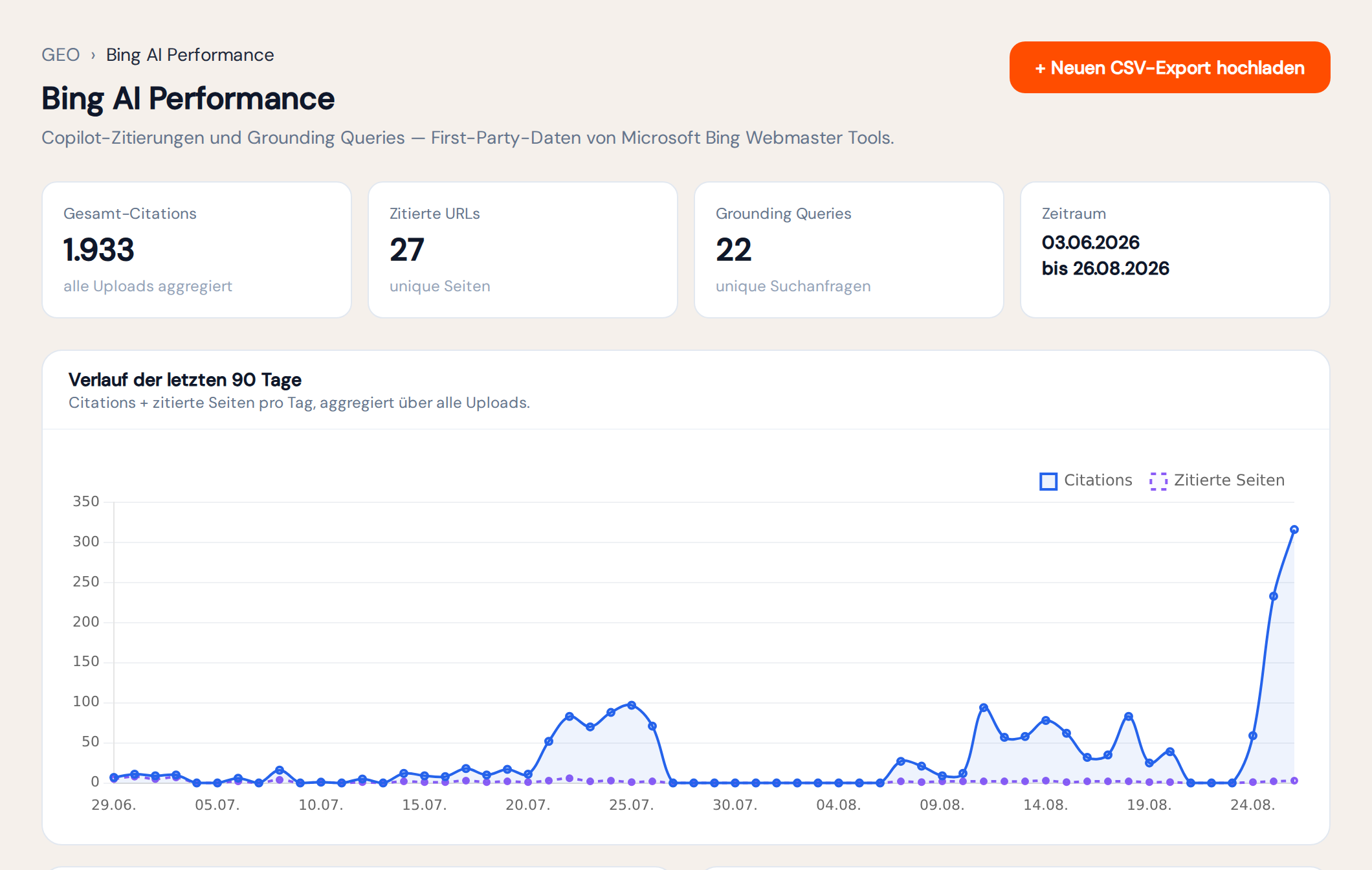
Used in Rankmio for
Import Bing AI performance data into Rankmio